Activation of the student account
All students of the University of Cologne receive a PIN with their documents at the matriculation.
In order to activate your student account, please have your matriculation and your PIN number ready and visit the following website:
Individual steps to activation
1. Accept terms of use
In order to register at uniKIM, you need to accept the terms of use of the University of Cologne. Read and accept the "Agreement" in the left menu bar to continue with your registration.
2. Registration
Use for the registration:
User name: Matriculation number
Password: PIN (that you received at your matriculation)
3. Accept accommodating arrangement
Accept the accommodating arrangement to go on with your registration/password change. In case you end the process at this point, you have to wait for five minutes to retry.
4. Password rules
Read the rules concerning your password carefully and set a new one.
5. Account- information
On the following page you can see your account information. Note the displayed user name. Please use this name to log in at the services of the University and uniKIM. You can also check all saved data about you.
Willkommen in UniKIM
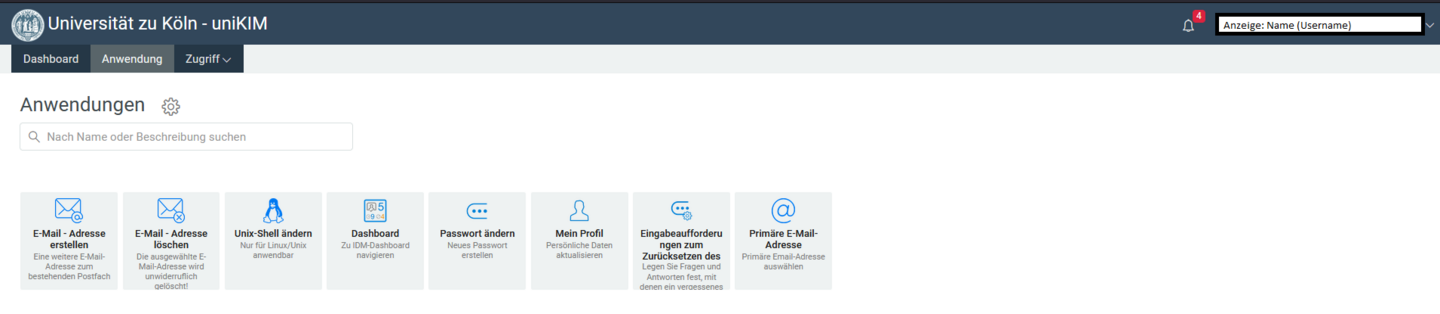
6. Username notieren!
Sie sehen nun das Dashboard. Bitte notieren Sie Ihren Usersname/Benutzernamen. Dieser wird ebenfalls in der oberen rechten Ecke angezeigt.
Dieser ist für Ihr Studium zentral und dient zur Anmeldung bei vielen Diensten der Universität zu Köln (z.B. Ilias, Klips2.0, VPN). Als Passwort dient das soeben festgelegte Passwort.
Unter Anwednungen finden Sie Ihre Optionen für die Accounteinstellungen (z.B. Passwort ändern).
Zum Ausloggen oben rechts auf den Namen bzw. Username klicken und anschließend auf “Abmelden” klicken.
Validity
The student account is valid for the time of you being matriculated at the University of Cologne. It will be deleted after your exmatriculation.
Contact
If you have any questions or problems, please contact the ITCC-Helpdesk