WLAN account
Employees of the University of Cologne can apply for wireless network access to the UKLAN university network for a guest.
This is limited to two WLAN accounts simultaneously with a maximum duration of four weeks. After an account has expired, a new account can be created.
Instructions
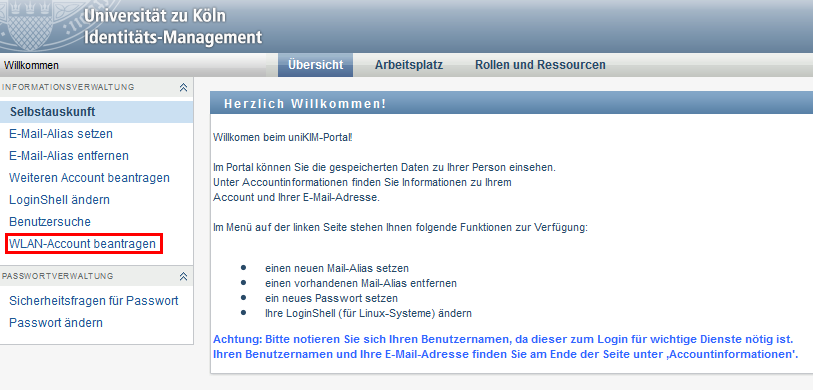
- Log in to the website kim.uni-koeln.de using your employee account.
- Click on "Apply for WLAN account" on the main page.
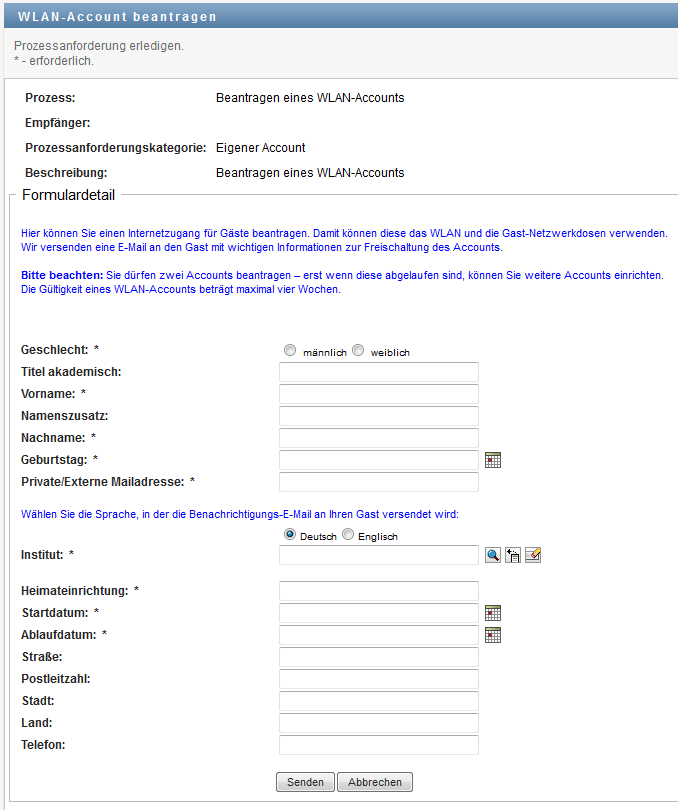
3. Please fill out the form for each WLAN account you require including your guest's details. These details will be deleted when the WLAN account expires.
4. Your guest will receive the account details via e-mail. Please note that the WLAN account can only be used from the given start date.
Access to Wi-Fi
Your guests can use this login data for the "Conference@University of Cologne" network without further installations.
Guest network sockets
The WLAN account can also be used for guest network sockets at the University of Cologne. These are located in the lecture halls and are labelled with a sticker.
Contact
If you have any questions or problems, please contact the ITCC-Helpdesk